Stop Babysitting Your Terminal: A Deep Dive into 'Happy' and the Future of Remote AI Agent Control
Stop staring at your terminal while AI agents run. Happy is an open-source tool that lets you monitor and control Claude Code from your phone. Here's the technical breakdown and security analysis.
Let’s be honest: The most boring part of the “AI Revolution” is the waiting.
If you’ve been using the new wave of autonomous coding agents (like Anthropic’s Claude Code, OpenDevin, or even just complex shell scripts generated by GPT-4) you know the pain. You fire off a prompt: “Refactor the entire authentication middleware to use JWTs instead of sessions.”
Then, you sit there.
You stare at the terminal. The AI thinks. It runs a grep. It thinks again. It writes a file. It asks for permission to delete a file. If you walk away to get coffee, the AI halts, waiting for your y or n input. You are no longer a coder; you are a terminal babysitter.
Enter Happy.
It’s a new open-source tool that popped up on GitHub recently, and while it looks simple on the surface, it represents a significant shift in developer UX. It allows you to “detach” your terminal session and carry it in your pocket, specifically tailored for AI agents like Claude Code.
This guide looks at what it does, how it is set up according to the project’s documentation, and where it fits. Project links: happy.engineering and github.com/slopus/happy.
The Problem: The “Human-in-the-Loop” Bottleneck
Before we look at the tool, we need to understand the friction it solves.
Autonomous agents are not fully autonomous yet. They are “Human-in-the-Loop” (HITL) systems. They need supervision.
- Permission Gating: To prevent an AI from accidentally
rm -rf /, tools like Claude Code ask for confirmation before executing shell commands. - Context Checks: The AI might ask, “I found three config files, which one is the source of truth?”
- Error Recovery: If a test fails, the AI needs you to look at the output and say “Try again” or “Ignore that.”
This creates a tether. You are physically chained to your desktop for a process that is 90% automated but requires 10% critical input.
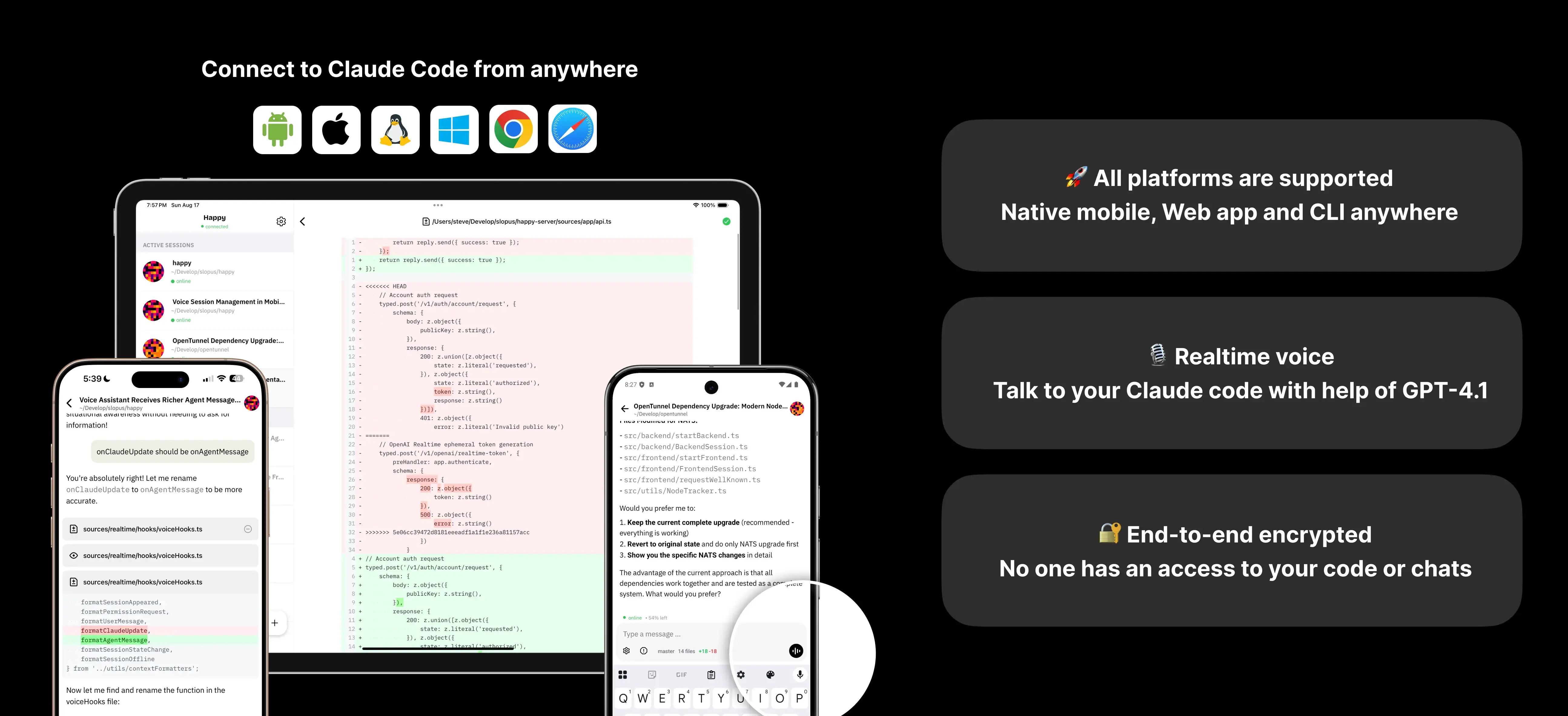
Happy (hosted at happy.engineering) cuts this tether by bridging your local terminal to a mobile-friendly web interface via a secure tunnel.
What is Happy?
At its core, Happy is a remote control layer for your CLI. It is currently optimized for Claude Code and Codex, but the architecture suggests it could support any interactive CLI tool.
Key Features at a Glance
- Real-time Mirroring: What happens in your terminal shows up on your phone instantly.
- Bi-directional Control: You can type commands, approve actions, or speak to the AI from your phone.
- Push Notifications: This is the killer feature. When the AI hits a breakpoint (like asking for permission), your phone buzzes.
- Seamless Handoff: Walk away from your desk -> use phone. Sit back down -> press a key -> control returns to the keyboard.
- E2E Encryption: Since you are transmitting potentially sensitive code, security is non-negotiable.
Hands-On: Setting Up the Workflow
Let’s get technical. How do you actually set this up? Unlike complex VNC solutions or setting up an SSH server on your laptop (which is a pain through firewalls), Happy uses a relay server approach similar to ngrok, but specifically for terminal streams.
Prerequisites
- Node.js installed (v18+ recommended).
- An active Claude Code setup (or similar agent).
- A smartphone.
Step 1: Installation
The tool is distributed via npm. Open your terminal:
# Install the global CLI tool
npm install -g happy-coder

# Verify installation
happy --version
Step 2: The “Pairing” Dance
This is where the UX shines. You don’t need to create an account with a password or configure port forwarding on your router. It uses a session-based pairing mechanism.
Run the command to start the wrapper:
# Start the Happy wrapper around your agent
happy claude
Note: If you are using a different agent or a custom script, you can usually pipe it or pass it as an argument, though the current documentation focuses heavily on Claude.
Once you run this, your terminal will display a QR Code.
- Open your phone camera.
- Scan the QR code.
- It opens the web client (or prompts to open the app if installed).
- Boom. Your terminal is now on your phone screen.
Step 3: A Typical Workflow
A common pattern looks like this (an illustrative scenario, not a benchmark):
- On your computer, start the agent through Happy, for example
happy claude, and give it a task such as writing a script. - Step away. The session keeps running on your machine, and the phone shows the agent’s progress.
- When the agent pauses for a permission prompt, such as installing a package, you get a notification and can approve or deny it from the phone.
- When you return to your desk, you continue in the same session on the computer.
The value is that permission prompts no longer block progress while you are away. The risk is the same convenience: approving commands from a small screen makes it easier to approve something you have not read carefully.
Under the Hood: How It Works
While the source code is the ultimate truth, we can infer the architecture based on its behavior and standard practices for such tools.
The Architecture
- The CLI Wrapper: When you run
happy, it spawns a child process (your shell/agent). It hooks intostdout(standard output) andstdin(standard input). - The WebSocket Tunnel: The CLI establishes a secure WebSocket connection to the Happy relay server.
- State Synchronization: It doesn’t just send text; it sends the state of the terminal. This is crucial for rendering TUI (Text User Interface) elements correctly on mobile.
- The Client: The mobile web app renders this stream. When you type or click a button on mobile, it sends a payload back through the socket -> relay -> CLI ->
stdinof the child process.
Security Analysis 🛡️
This is the part where every CTO gets nervous. You are piping your terminal output through a third-party server.
The Good:
- End-to-End Encryption (E2E): The developers claim E2E encryption. This usually means the encryption keys are generated locally during the QR code handshake. The relay server (Happy’s infrastructure) sees only encrypted blobs. It cannot read your code or your API keys.
- Ephemeral Sessions: The connection seems to be session-based. Once you kill the terminal process, the link is dead.
The Risks:
- Metadata Leakage: Even with E2E, the server knows when you are coding and how much data you are sending.
- Supply Chain Attacks: As with any
npm install -g, you are trusting the package maintainer not to inject malicious code in a future update. - Screen Exposure: If you are coding in a coffee shop and your phone lights up with sensitive API keys on the screen, that’s a physical security risk (shoulder surfing).
Recommendation: For general development, it’s likely safe. For highly classified, air-gapped government work? You shouldn’t be using cloud relays anyway.
Critical Perspective: Hype vs. Utility
Is this tool revolutionary? No. Is it useful? Yes.
The “Pros” ✅
- Mental Health: It breaks the “staring contest” with the AI. You can multitask physically (fold laundry, walk the dog) while the AI works.
- Notification System: This is superior to SSH. SSH doesn’t natively push a notification to your iOS lock screen when a script pauses for input. Happy does.
- Zero Config: No
~/.ssh/confighacking, no dynamic DNS, no VPNs. It just works.
The “Cons” ❌
- Latency: There is a slight delay. It’s fine for “Approve/Deny,” but I wouldn’t want to write actual code on the mobile keyboard via this connection.
- Dependency: You are relying on their relay servers. If
happy.engineeringgoes down, the tool stops working. (Unless they release a self-hosted docker container for the relay, which they should). - Limited UI: Currently, it mirrors the terminal. It doesn’t reformat the code for mobile reading. Reading a 500-line diff on an iPhone Mini is still painful.
The Future: From “Coding” to “Directing”
Tools like Happy are harbingers of a bigger trend. We are moving away from writing code and toward directing code generation.
In the traditional workflow, the keyboard is the primary input device. In the Agentic workflow, the primary input is decision making.
- Old Way: Type
git commit -m "fix bug". - New Way: Review the AI’s proposed fix, check the diff, and tap “Approve.”
This “Approve” action doesn’t require a mechanical keyboard and a dual-monitor setup. It requires a screen and a thumb.
What Happy Needs to Add Next
To truly become the “WhatsApp for Coding Agents,” Happy needs to evolve beyond a terminal mirror:
- Structured Diff Views: Don’t just show raw text. Parse the git diff and show a nice UI with green/red highlights.
- Custom Action Buttons: Instead of typing
yes, give me a big green button. - Self-Hosted Option: For enterprise users, allow us to run the relay server on our own AWS/DigitalOcean instance.
Conclusion
Happy is a niche tool that solves a very specific, very modern problem. If you don’t use AI agents, this tool is useless to you. But if you find yourself spending hours a day waiting for Claude or GPT-4 to finish a task, this tool buys you back your freedom.
It transforms the development experience from a desk-bound chore into a mobile-supervisory role. It’s rough around the edges, but it’s a glimpse into the future where developers are more like factory managers walking the floor with a tablet, rather than assembly line workers turning the screws.
Verdict: Worth the install. Just keep an eye on what data you’re piping through it.
Quick Reference: Commands
| Action | Command |
|---|---|
| Install | npm install -g happy-coder |
| Start (Default) | happy |
| Start with Claude | happy claude |
| Help | happy --help |
Disclaimer: This review is based on the open-source version of Happy available as of March 2024. Always audit third-party tools before using them in production environments.
Reader Dispatches
No reader responses yet. Share your technical perspective below.
Related Posts
Moltbot & The Rise of Local Agents: 500+ Ways to Give AI Control
Moving from chatbots that talk to agents that act. A deep dive into the Moltbot ecosystem with 565+ local skills—from Docker deployment to grocery ordering.
Clawdbot: The 'Agentic' AI That Actually Does the Work (And Why It Scares Me)
Move over, chatbots. Clawdbot is an open-source agent that lives on your Mac, controls your terminal, and texts you back on WhatsApp. Here is the deep-dive technical review and setup guide you won't find in the hype headlines.
MetaGPT: Stop Chatting with AI, Start Managing an AI Software Company
MetaGPT treats LLMs as a structured software company with PMs, Architects, and Engineers—not just chatbots with tools. Here's how to deploy your own digital workforce.