Z-Image: Why Tongyi's New 10B Parameter Model Matters for Power Users
Move over Turbo models. Tongyi-MAI's Z-Image is a 10B parameter, undistilled Single-Stream Diffusion Transformer designed for serious fine-tuning and complex workflows. Here is the deep dive.
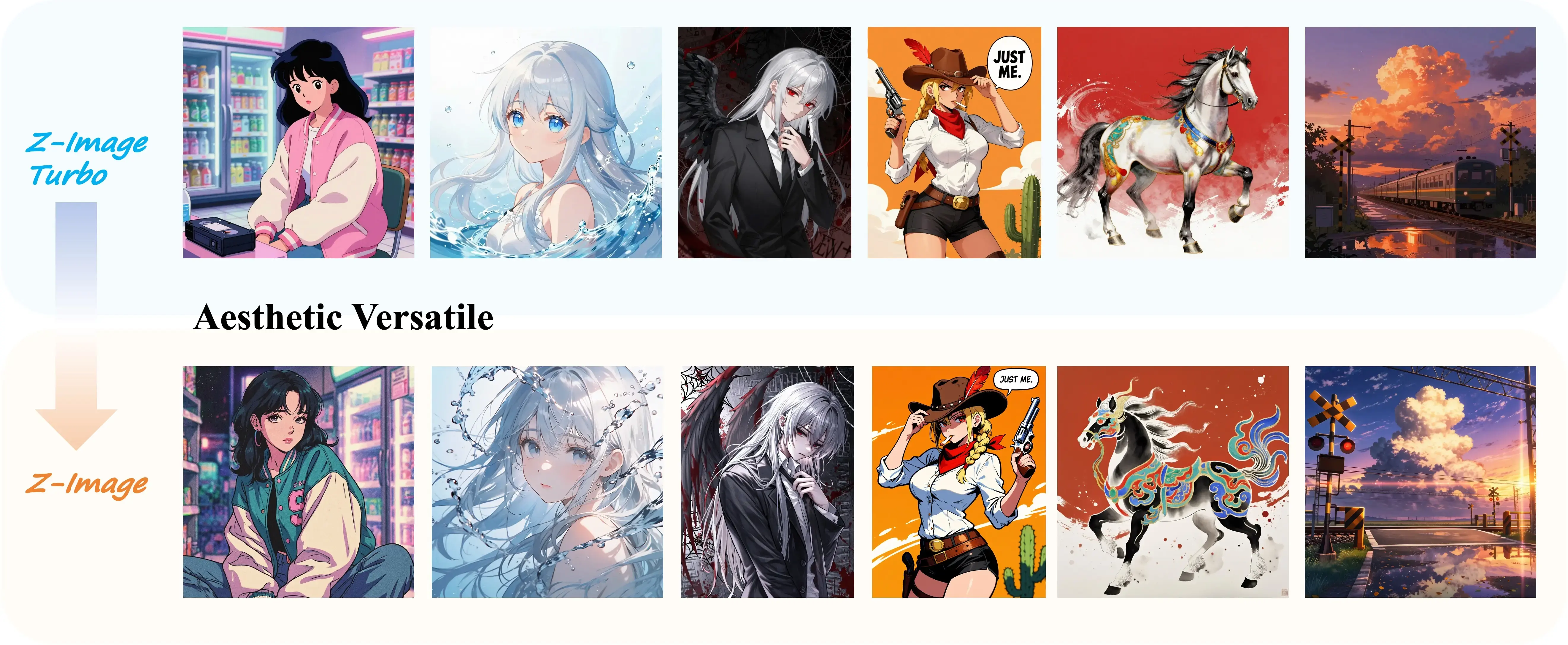
The open-source image generation landscape is currently fighting a war on two fronts. On one side, we have the “Speed Demons”(distilled models like SDXL Turbo or Hyper-SD that spit out images in 4-8 steps. On the other side, we have the “Heavyweights”)massive models like FLUX.1 that prioritize prompt adherence and raw quality over speed.
Enter Z-Image (and its sibling Z-Image-Turbo) from the Tongyi-MAI team.
Released quietly on ModelScope, Z-Image isn’t just another checkpoint to throw into your models folder. It represents a significant architectural shift towards Single-Stream Diffusion Transformers (SiT) and, more importantly, it draws a line in the sand between “consumption” models and “creation” models.
If you are a developer building LoRAs, a researcher needing raw training signals, or an artist tired of the “plastic” look of distilled models, this is the model you need to be paying attention to.
The “Undistilled” Philosophy
We need to talk about Distillation. In the AI world, distillation is the process of compressing a large, complex model (the teacher) into a smaller, faster one (the student).
Most “Turbo” models you see today are distilled. They are fantastic for generating a quick, pretty image. However, they often suffer from what I call “Creative Collapse.” Because they are optimized for specific aesthetic outcomes, they resist negative prompts, struggle with complex CFG (Classifier-Free Guidance) scales, and are notoriously difficult to fine-tune.
Z-Image is different. It is an undistilled foundation model.
Why does this matter?
- Full Training Signal: It preserves the complete probability distribution of the training data. This makes it an ideal base for training ControlNets and LoRAs.
- CFG Sensitivity: Unlike Turbo models that often ignore guidance scales, Z-Image respects them. This gives you granular control over how much the model listens to your prompt versus its own internal biases.
- Negative Prompting: You can actually tell it what not to do. Turbo models often ignore negative prompts because their inference steps are too few to correct course.
Architecture: The 10 Billion Parameter Behemoth
Z-Image clocks in at 10.26 Billion parameters. To put that in perspective:
- SDXL: ~2.6B parameters
- Stable Diffusion 3 Medium: ~2B parameters
- FLUX.1: ~12B parameters
Z-Image is punching in the heavyweight class alongside FLUX. It utilizes a Single-Stream Diffusion Transformer (SiT) architecture. Unlike traditional U-Net based diffusion models (like SD1.5), Transformers scale significantly better with more data and parameters.
The “Single-Stream” aspect implies a unified processing of text and image tokens, which generally leads to superior semantic understanding. When you ask for “a cat on a blue chair,” the model understands the relationship between the objects better than older architectures.
Z-Image vs. Z-Image-Turbo: Choose Your Fighter
Tongyi-MAI released two versions, and understanding the difference is important for your workflow.
| Feature | Z-Image (The Creator) | Z-Image-Turbo (The Consumer) |
|---|---|---|
| Core Philosophy | Maximum Control & Diversity | Maximum Speed & Aesthetics |
| CFG Support | ✅ Full Support | ❌ No (Fixed) |
| Inference Steps | 28 - 50 (Slow & Steady) | 8 (Lightning Fast) |
| Fine-tuning | ✅ Excellent Base | ❌ Difficult |
| Negative Prompts | ✅ High Fidelity | ❌ Ignored/Weak |
| Visual Style | High Diversity (Photoreal to Anime) | Very High (But rigid/repetitive) |
| RL Tuning | ❌ No | ✅ Yes (Reinforcement Learning) |
The Verdict:
- Use Turbo if you are building a user-facing app where latency is king and users just want a “good looking” image with one click.
- Use Z-Image (Base) if you are an artist, a prompt engineer, or a developer training custom adapters. The lack of RL (Reinforcement Learning) in the base model means it hasn’t been “brainwashed” into only producing one specific type of pretty image.
🛠️ Hands-On: Running Z-Image Locally
Let’s get this running. Note that due to the 10B parameter size, you will want a GPU with substantial VRAM (likely 16GB+ for comfortable inference, or 24GB for optimal performance).
1. Installation
You need the latest diffusers and modelscope libraries.
# Install the bleeding edge diffusers to ensure SiT support
pip install git+https://github.com/huggingface/diffusers

# Install ModelScope and utilities
pip install -U huggingface_hub modelscope accelerate transformers
2. Python Inference Pipeline
Here is a strong script to get you started. I’ve added memory optimizations (bfloat16) which are practically mandatory for a model of this size.
import torch
from modelscope import ZImagePipeline

# ⚠️ MEMORY WARNING: This model is 10B params.
# If you have <16GB VRAM, you might face OOM errors.
# Ensure you are using CUDA.

def generate_z_image():
    print("🚀 Loading Z-Image Pipeline...")

    # Load the pipeline with bfloat16 to save memory without losing dynamic range
    pipe = ZImagePipeline.from_pretrained(
        "Tongyi-MAI/Z-Image",
        torch_dtype=torch.bfloat16,
        low_cpu_mem_usage=False, # Set to True if you have low system RAM
    )

    # Move to GPU
    pipe.to("cuda")

    # A complex prompt to test semantic understanding
    prompt = (
        "Cinematic photography, medium shot. Two young Asian women standing closely together "
        "against a textured grey wall. Left woman: long curly hair, navy blue sweater with cream ruffled sleeves, "
        "arms crossed behind back. Right woman: straight shoulder-length hair, cream sweatshirt with text "
        "'Turn the tables', arms crossed over chest. Soft natural lighting, neutral tones, high detail."
    )

    # Negative prompts work well with the Base model (unlike Turbo)
    negative_prompt = "blurry, low quality, distorted text, bad anatomy, extra limbs, oversaturated"

    print("🎨 Generating image...")

    image = pipe(
        prompt=prompt,
        negative_prompt=negative_prompt,
        height=1280, # 720p portrait
        width=720,
        cfg_normalization=False, # Important: Experiment with this toggle
        num_inference_steps=50,  # 28-50 is the sweet spot
        guidance_scale=4.0,      # 3.0 - 5.0 is recommended
        generator=torch.Generator("cuda").manual_seed(42),
    ).images[0]

    output_path = "z_image_result.png"
    image.save(output_path)
    print(f"✅ Image saved to {output_path}")

if __name__ == "__main__":
    generate_z_image()
💡 Pro-Tips for Prompting Z-Image
- Guidance Scale (CFG): Keep it between 3.0 and 5.0. Unlike older SD models where you might push CFG to 7 or 8, SiT architectures often “burn” the image at high CFG.
- Resolution: The model is trained on high-res data. It supports flexible aspect ratios, but total pixel areas between 512x512 and 2048x2048 work best.
- Steps: Do not skimp on steps. This is not a Turbo model. Give it at least 30 steps to resolve fine details, especially faces.
💻 For Developers: API Integration
If you don’t have a massive GPU rig, Tongyi provides an API via ModelScope. This is useful for integrating Z-Image into web apps or Discord bots.
Here is a clean, asynchronous-ready implementation:
import requests
import time
import json
import os
from PIL import Image
from io import BytesIO

# 🔑 Configuration
API_KEY = os.getenv("MODELSCOPE_TOKEN", "YOUR_TOKEN_HERE")
BASE_URL = 'https://api-inference.modelscope.cn/'

def generate_via_api(prompt, output_filename="api_result.jpg"):
    headers = {
        "Authorization": f"Bearer {API_KEY}",
        "Content-Type": "application/json",
        "X-ModelScope-Async-Mode": "true" # Async is recommended for heavy models
    }

    payload = {
        "model": "Tongyi-MAI/Z-Image",
        "input": {
            "prompt": prompt
        },
        "parameters": {
            "n": 1,
            "size": "1024*1024"
        }
    }

    print(f"📡 Sending request for: '{prompt}'")

    try:
        # 1. Submit Task
        response = requests.post(
            f"{BASE_URL}v1/images/generations",
            headers=headers,
            data=json.dumps(payload)
        )
        response.raise_for_status()
        task_id = response.json()["task_id"]
        print(f"⏳ Task ID: {task_id}. Waiting for generation...")

        # 2. Poll for Results
        while True:
            result = requests.get(
                f"{BASE_URL}v1/tasks/{task_id}",
                headers={**headers, "X-ModelScope-Task-Type": "image_generation"},
            )
            result.raise_for_status()
            data = result.json()

            status = data.get("task_status")

            if status == "SUCCEED":
                img_url = data["output_images"][0]
                print("⬇️ Downloading image...")
                image = Image.open(BytesIO(requests.get(img_url).content))
                image.save(output_filename)
                print(f"✅ Saved to {output_filename}")
                break

            elif status == "FAILED":
                print(f"❌ Generation Failed: {data}")
                break

            time.sleep(2) # Be polite to the API

    except Exception as e:
        print(f"⚠️ Error: {e}")

# Usage
# generate_via_api("A cyberpunk street food vendor in Tokyo, neon lights, rain, highly detailed")
Critical Analysis: Is It Worth the Switch?
Z-Image enters a crowded market. Why should you care when FLUX.1 exists?
The Pros ✅
- Diversity: The “undistilled” nature is real. If you generate 10 images with different seeds, you get 10 genuinely different compositions. Turbo models often give you the same face in slightly different poses.
- Text Rendering: While not explicitly advertised as a text-rendering specialist, the SiT architecture generally handles text (like the “Turn the tables” example in the prompt) better than U-Net models.
- License: Apache 2.0. This is huge. It allows for commercial usage and modification, which is friendlier than some of the restrictive licenses we’ve seen recently from other labs.
The Cons ❌
- Hardware Demands: 10B parameters is a high barrier to entry for local users. You aren’t running this on a laptop.
- Ecosystem: Being new, it lacks the massive library of LoRAs and ControlNets that SDXL or SD1.5 have. You are an early adopter here.
Final Thoughts
Z-Image is a “builder’s model.” It’s not the model you use to generate a quick meme for Twitter-use Z-Image-Turbo for that.
Z-Image is the model you use when you want to train a LoRA for a specific architectural style, or when you need to generate complex, multi-subject scenes where negative prompting is essential. It represents a mature step in AI image generation: moving away from “one-click magic” back towards “controllable, professional tools.”
If you have the VRAM, give it a spin. The diversity alone is worth the download.
References:
Reader Dispatches
No reader responses yet. Share your technical perspective below.
Related Posts
OpenAI Prism Review: Did We Just Witness the Death of Overleaf?
OpenAI Prism is a GPT-5.2 powered LaTeX editor that wants to be your co-author. We dive into the features, privacy concerns, and whether it's time to migrate from Overleaf.
Browser-Use: The Missing Link Between LLMs and Real-World Action
Stop building brittle scrapers. Here is how 'browser-use' gives your AI agents eyes and hands to navigate the modern web, plus a critical look at the costs and reality of deployment.
Qoder's Gambit: Can a Custom-Trained 'Agentic' Model Dethrone Cursor?
Qoder releases Qwen-Coder-Qoder, a custom model for agentic coding claiming to outperform Cursor Composer-1. Here's the 'Rewarder-Attacker' training methodology and what it means for developers.