The Ultimate Guide to Agent Skills & Boris Cherny's 13 Rules for Claude Code
From prompt engineering to agent orchestration: Learn how to master Agent Skills and adopt the 'vanilla' yet powerful workflow of Claude Code's creator.
Hello, fellow developers.
If you’ve been following the AI coding space, you’ve probably heard the buzz around Agent Skills. What started as a proprietary feature for Claude has now exploded into an open standard as of December 2025. With support landing in tools like Codex, Cursor, and OpenCode, Agent Skills—alongside the Model Context Protocol (MCP)—are rapidly becoming the lingua franca of the AI Agent era.
But tools are only as good as the hands that wield them. Recently, Boris Cherny, the founding engineer of Claude Code, shared his personal “13 Rules” for using the tool he built. Combining these insights with the power of Agent Skills gives us a glimpse into the future of software development.
We are transitioning from the era of Prompt Engineering to Agent Orchestration. Here is your complete guide to making that leap.
Part 1: What Are Agent Skills? (The TL;DR)
An Agent Skill is an “Instruction Manual with a Table of Contents.” It’s a mechanism for Progressive Disclosure of context.
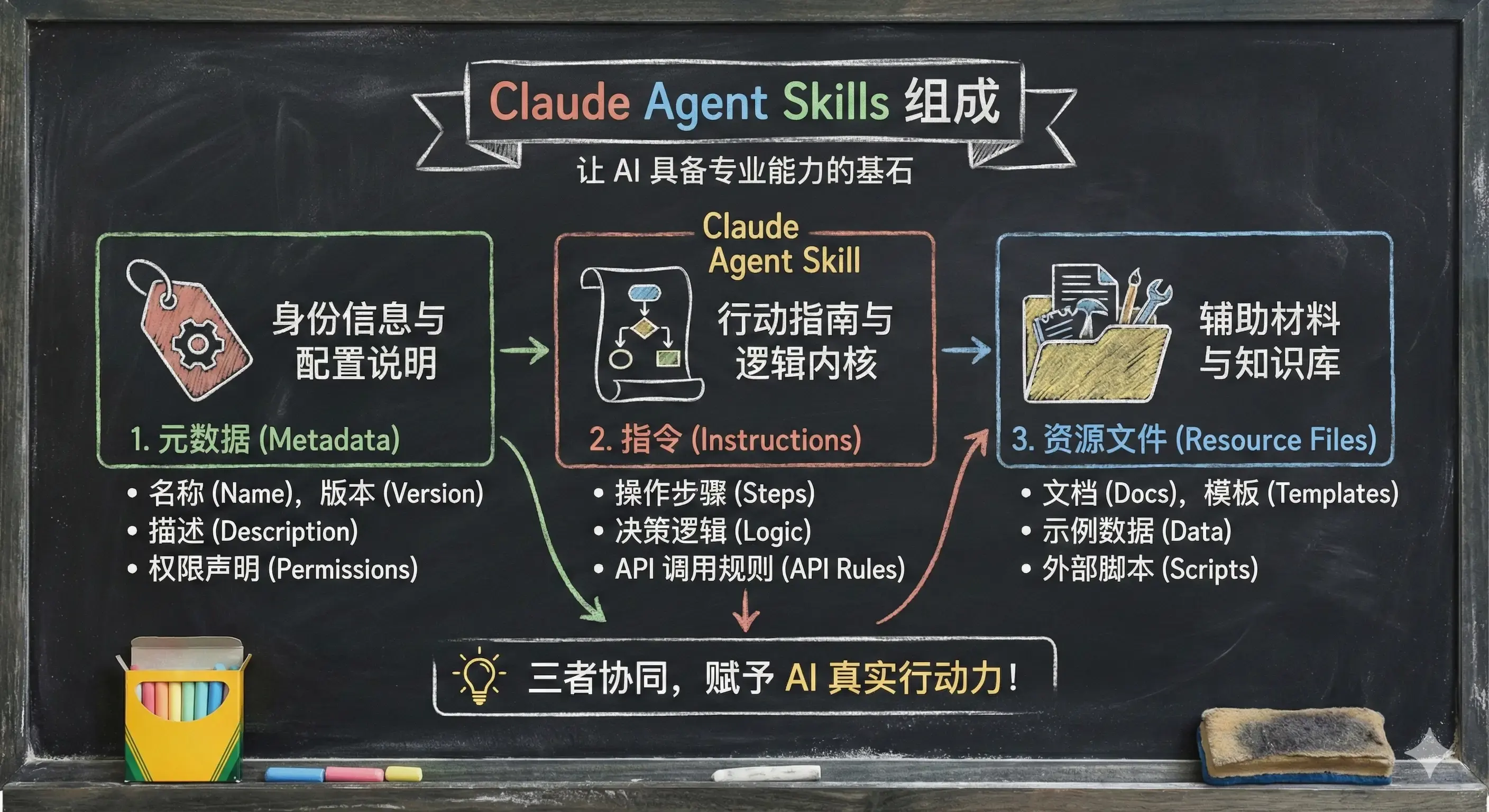
Traditional prompting involves stuffing every possible instruction into the context window. This burns tokens, confuses the model, and slows everything down. Agent Skills solve this by breaking prompts into three layers:
- Metadata (The Table of Contents): The name and description of the skill. This is always loaded, allowing the AI to know what it can do.
- Instructions (The Chapters): The specific rules and steps. These are loaded on demand only when the AI decides to use the skill.
- Resources (The Appendix): Scripts, templates, and reference docs. These are also loaded on demand or executed directly.
The Core Logic: The AI scans the metadata. If it sees a match for the user’s request, it “opens the book” (loads instructions) and, if necessary, “uses the tools” (executes scripts). This architecture drastically reduces token consumption and keeps the context window clean.
Why Do You Need This?
Imagine you have a strict team Code Review policy or a complex workflow for parsing PDF invoices.
- Before: You pasted the guidelines into every chat or stuffed them into a massive System Prompt.
- Now: You package them into a Skill. The AI ignores it until you say, “Review this PR,” at which point it dynamically loads the relevant rules.
Part 2: Hands-On — Building Your First Skill
Let’s get our hands dirty. We’ll use Claude Code as our environment.
1. The Directory Structure
Skills live in folders. For a project-specific skill, create:
project-root/.claude/skills/your-skill-name/
Inside this folder, you must have one essential file: SKILL.md.
2. Writing SKILL.md
Let’s build a skill called srt-to-markdown that converts subtitle files into clean study notes.
---
name: srt-to-markdown
description: Use this when the user wants to convert .srt subtitle files into study notes.
---
# SRT to Markdown Converter
## Instructions
You are an expert at processing subtitles. Follow these steps:
1. Read the provided .srt file.
2. Strip out timestamps and sequence numbers.
3. Merge fragmented sentences into coherent paragraphs.
4. Insert `` at key topic transitions.
5. Output a beautifully formatted Markdown document.
## Examples
...3. Testing It Out
Launch Claude Code and type /skills. You should see your new skill listed. Drag an .srt file into the chat, and Claude will recognize the file type and ask, “Should I use the srt-to-markdown skill for this?”
Once you confirm, it loads the instructions and executes the task.
Part 3: The 13 Rules of Boris Cherny
Knowing how to write a skill is one thing; knowing how to work with an agent is another. Boris Cherny’s workflow is surprisingly “vanilla,” but it reveals deep insights into effective AI collaboration.
Rule 1: Parallelize, Don’t Serialize
Boris runs 5 instances of Claude Code simultaneously in his terminal.
- Tab 1: Implementing Feature A
- Tab 2: Running tests for Feature A
- Tab 3: Refactoring Module B
- …
Insight: Don’t watch the AI type. Treat them like async workers. If you have 5 tasks, spawn 5 agents. Efficiency comes from parallel execution.
Rule 2: Always Use Opus 4.5 + Thinking
Despite the cost and latency, Boris sticks to Opus. Insight: “It requires less steering.” A cheaper model might need 3 corrections to get it right. Opus usually gets it in one shot. In coding, Accuracy > Speed. The time you save on corrections outweighs the generation time.
Rule 3: CLAUDE.md is Institutional Memory
This is arguably the most impactful tip for teams. Maintain a CLAUDE.md file in your git root.
- What goes in?
- Mistakes Claude has made (“Never use
enum, use union types”). - Team conventions (“All dates must be UTC”).
- Mistakes Claude has made (“Never use
- The Workflow: Whenever you catch a bug in a PR that Claude caused, tag
@Claudeand tell it to add a rule toCLAUDE.md. - The Result: Your codebase accumulates “wisdom.” New hires (and new AI sessions) instantly know the unwritten rules of your team.
Rule 4: Plan Mode is Non-Negotiable
For any non-trivial task, Boris starts in Plan Mode (Shift+Tab twice). He iterates on the plan with the AI until it’s solid. Only then does he switch to execution mode. Insight: “A good plan is really important!” It prevents the AI from going down a rabbit hole and wasting tokens on the wrong approach.
Rule 5: Verification Loops
“Give Claude a way to verify its work.” If the AI can run a test, execute a script, or check the UI after writing code, the quality jumps 2-3x. Boris’s workflow often involves asking Claude to write the code and the verification step (e.g., “Write a script to verify this API returns 200”).
Part 4: Advanced Skills — Adding “Plugins”
The real power of Agent Skills lies in the Resource Layer. Your skill folder can contain:
scripts/: Python or Bash scripts.references/: Documentation or “Gold Standard” examples.
Example: The “Real” Screenshot Tool
In our previous srt-to-markdown example, we just added placeholders. Now, let’s add a scripts/screenshot.py that uses ffmpeg to actually capture frames.
Update SKILL.md: “After generating the Markdown, execute python scripts/screenshot.py to replace placeholders with actual images.”
Key Takeaway: The AI doesn’t read the Python code into context; it executes it. This keeps your token usage low while giving the agent “hands” to perform complex tasks.
Part 5: Skills vs. MCP — The Future Architecture
A common question: “How is this different from the Model Context Protocol (MCP)?”
| Feature | Agent Skills | MCP (Model Context Protocol) |
|---|---|---|
| Focus | Prompting & Workflow | Tooling & Data Connection |
| Analogy | The Instruction Manual | The Toolbox |
| Token Cost | Low (On-demand) | Higher (Definitions loaded upfront) |
| Complexity | Low (Markdown) | High (Server code) |
The Verdict:
- Use Skills to teach the AI how to think (processes, guidelines, style).
- Use MCP to give the AI capabilities (database access, GitHub API, Slack integration).
The Ultimate Workflow:
- Skill: “Write a blog post following our brand voice.” (Loads
SKILL.mdand reference articles). - MCP: “Upload it to the CMS.” (Calls the CMS API via MCP).
Conclusion
We are witnessing the maturity of AI coding tools. It’s no longer just about “smarter models”; it’s about smarter workflows.
If you are using Claude Code, Cursor, or any modern AI IDE, I urge you to adopt Boris’s playbook:
- Codify your knowledge into
CLAUDE.mdand Skills. - Parallelize your work.
- Mandate verification.
The future belongs to developers who can orchestrate agents, not just chat with them.
References:
Reader Dispatches
No reader responses yet. Share your technical perspective below.
Related Posts
OpenCode Guide: Installation, Models, Plan/Build Agents and Moving from Claude Code
A practical guide to OpenCode, the open-source AI coding agent: installation on macOS, Linux and Windows, connecting cloud or Ollama models, Plan and Build agents, permissions, and Claude Code compatibility.
Stop Repeating Yourself: Mastering Claude Agent Skills for Programmable Context
Agent Skills are not just saved prompts; they are the transition from 'chatting with AI' to 'engineering AI behavior.' Learn how to use progressive disclosure and modular Markdown to permanently fix your workflow context.
MCP Practical Guide: Building Reliable AI Agent Workflows with Model Context Protocol in 2026
Learn MCP from scratch — build standardized AI Agent tool integrations with complete code examples, architecture design, and best practices.